February 2025 Zoho Monthly Newsletter
 Monthly Newsletter - February 2025
Welcome to the Zoho Newsletter
Provided for your information are Zoho tips, and useful tricks.
For areas of interest or topics related to Zoho, feel free to submit a ticket.
Functionality Features in Zoho
The Zoho Newsletter began its distribution in 2021.
We have tapped the archives to re-introduce some of the Ticketing Systems useful features.
We have tapped the archives to re-introduce some of the Ticketing Systems useful features.
The next few Newsletters will pinpoint previously introduced Zoho features and functions.
The features below are from prior Newsletters. Use the link to access the complete Newsletter to view specific details.
- @mentions in Comments - October 2024 Zoho Newsletter
- Macros - February 2023 Zoho Newsletter
- Suggested Articles - April 2023 Zoho Newsletter
- Ticket Peek - December 2021 Zoho Newsletter
- Ticket Share Process - January 2024 Zoho Newsletter
@mentions in Comments
Zoho OnSite Support Team has enabled notifications for @mentions in tickets.
When you use the feature to contact other team members from a Zoho Ticket, they will receive an Outlook notification alerting them their help is needed to complete support requests.
Caveats to using @mentions:
- You can only @mention other agents on your team with access to the same departments.
- You can only use @mentions in Private Comments.
- If you require help from someone in another department, the Shared Ticket Process is the best way to reach the Team.
How to use @mentions in a Comment:
- Select the Comment Icon in the top right of the ticket.
- Use '@' to start typing the agent's name and select their name (if you do not select them from the menu, they will not receive the notification).
- Once you post the Comment, their name will appear as a hyperlink.
Macros
Reasons to Use Macros:
- Useful when replying to multiple tickets at once
- Student Orientation Tickets
- Exam Review Tickets
- Broken Links
- Course Content Issues that affect multiple users
- Assigning Multiple Tickets to one person
- Closing Multiple Tickets at once
Applying Macros
- Hover over the email Icon on the left side of the Ticket. You will see a checkbox to select the ticket. Select the tickets you want to apply a Macro.
- Use the Toolbar and select the action you want to perform - Assign To, Close, or apply Macro.
- Assign To allows you to select a person to assign the selected tickets.
- Close allows you to close the tickets selected at once
- Macro displays a list of the macros for your department. Select the appropriate Macro to respond to the recipients.
Suggested Articles
What are Suggested Articles?
- Knowledge Base articles that can be used to help answer and complete support ticket requests.
Why use Suggested Articles?
- You can view how-to guides in Box quickly and directly within Zoho.
- You never have to leave Zoho or open a new browser window to access Box content.
- Directional information can be pasted straight into the ticket.
- The use of Suggested Articles gives you quicker access to Academic Partners' How-To Guides.
- Helps with Partners you may not be familiar with.
How do you use Suggested Articles?
- From the ticket panel properties menu- locate the Suggested Articles Icon.
- Use keywords to search Suggested Articles.
- Keyword Examples: Canvas, Blackboard, Sakai, Box, link, broken, etc.
- To view a Suggested Articles content - click to open.
- Image one displays the Suggested Article instructions on "Adding Courses to Dashboards in Canvas"
- Once opened, the contents of the Suggested Article can be pasted directly into the Zoho Ticket and becomes part of the Ticket response.
- Use the "Paste to Ticket" link (highlighted in yellow on Image 1).
- Image two is a preview of the Suggested Article pasted into the Zoho ticket.
Ticket Peek
What is Ticket Peek?
Ticket Peek is a preview screen that allows you to quickly view support tickets from the Dashboard. When you use Ticket Peek, you can see every interaction the support team has had with the customer, as well as the ticket properties.
How to Use Ticket Peek:
- From the Dashboard, hover on any ticket and select the Ticket Peek Icon.
- The Ticket Peek will be visible. To close the Ticket Peek, click the X in the top left.
Ticket Share Process
What is the Ticket Share Process?
The Zoho Ticket Share process allows you to share a Ticket that requires additional assistance.
For example, you may share Tickets with members of the Ed-Tech Service Teams, or the ESM can share tickets with an ESS Agent.
- Canvas Onsite Support
- Ed Tech Systems
- ESM to ESS agents
- Testing Support Team
Follow the steps below to use the Ticket Share Process: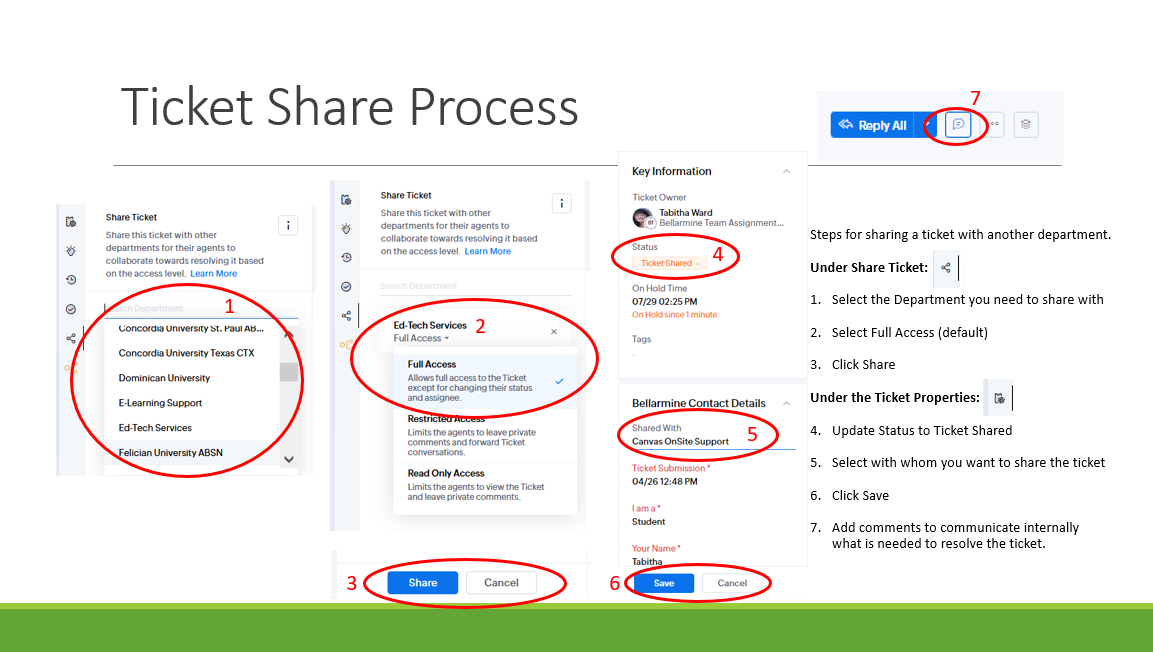
If you need anything, contact the Zoho On-Site Support Team.
OR
Consult the Orbis Ed-Tech Services Help Center.
We appreciate all you do!
We are here to support you and assist in supporting your Partners.
Related Articles
September 2025 Zoho Monthly Newsletter
Monthly Newsletter - September 2025 Welcome to the Zoho Newsletter Zoho tips and useful tricks are provided for your information. For areas of interest or topics related to Zoho, feel free to submit a ticket. January February March April May June ...August 2025 Zoho Monthly Newsletter
Monthly Newsletter - August 2025 Welcome to the Zoho Newsletter Zoho tips and useful tricks are provided for your information. For areas of interest or topics related to Zoho, feel free to submit a ticket. Your Zoho OnSite Support Team THANKS YOU for ...July 2025 Zoho Monthly Newsletter
Monthly Newsletter - July 2025 Welcome to the Zoho Newsletter Zoho tips and useful tricks are provided for your information. For areas of interest or topics related to Zoho, feel free to submit a ticket. Functionality Features in Zoho The Zoho ...April 2025 Zoho Monthly Newsletter
Monthly Newsletter - April 2025 Welcome to the Zoho Newsletter Zoho tips and useful tricks are provided for your information. For areas of interest or topics related to Zoho, feel free to submit a ticket. Functionality Features in Zoho The Zoho ...May 2025 Zoho Monthly Newsletter
Monthly Newsletter - May 2025 Welcome to the Zoho Newsletter Zoho tips and useful tricks are provided for your information. For areas of interest or topics related to Zoho, feel free to submit a ticket. Functionality Features in Zoho The Zoho ...